CueSift取幕
Subtitle format guide

What Is an SRT File? Format, Example, and How to Use It

An SRT file is a plain-text subtitle file that pairs each line of dialogue or caption text with a start and end time. This guide shows the exact file structure, a downloadable sample, practical ways to open and use it, and the errors to check before delivery.

Published: August 11, 2026Last verified: August 11, 2026

Short answer

An SRT file is a plain-text file that tells a video player what subtitle text to show and when to show it. Each cue normally contains a sequence number, a start and end timestamp, one or more text lines, and a blank line before the next cue.

The SRT does not contain the video or audio. You can inspect it in a text editor, preview it with a compatible player, import it into an editor, or upload it to a platform that accepts SRT. Check the destination's rules because SRT support, styling, and encoding requirements vary.

Try CueSift with a public link

Editorial owner: CueSift. We checked the format claims against the Library of Congress and current YouTube documentation, created the sample specifically for this guide, and validate its four cue blocks in the site test suite. A separate production check confirmed that CueSift exported one six-cue YouTube SRT on August 10, 2026; that single check is not a universal compatibility claim.

SRT file quick facts

Think of an SRT as a timed text document that travels beside a video. It is small and readable because it describes subtitle content and timing rather than carrying the media itself.

Full nameSubRip Subtitle
File extension.srt
File typePlain text
StoresCue order, start and end times, and subtitle text
Does not storeVideo, audio, images, or a portable font choice
Common timestampHH:MM:SS,mmm --> HH:MM:SS,mmm
Required headerNone

SRT is simple but not completely standardized. The table describes the common structure used by the downloadable sample; always verify the target platform's current import rules.

What does an SRT file look like?

An SRT repeats the same cue pattern from the beginning of the video to the end. This example shows cue 2 from the downloadable file. The timestamp uses a comma before milliseconds, and the arrow is two hyphens followed by a greater-than sign.

2
00:00:03,700 --> 00:00:06,600
Each cue includes a start and end time.

Download and inspect a real sample

This four-cue UTF-8 sample was written for this guide, so it contains no third-party transcript. Download it, open it as plain text, and compare each cue with the visual below.

Download the sample SRT
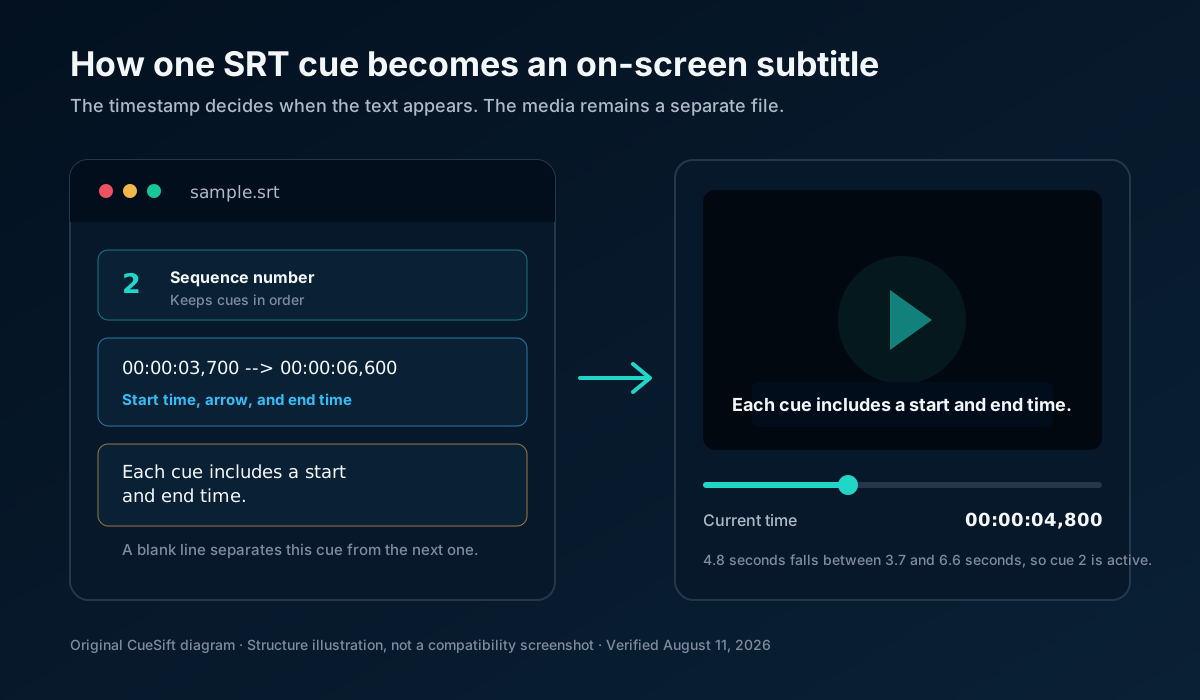
A local test checks all four sequence numbers, timestamp patterns, forward time ranges, text blocks, and the final newline.

At 4.8 seconds, cue 2 is active because the time falls between 3.7 and 6.6 seconds.

Anatomy of an SRT cue and the subtitle it displays at 4.8 seconds
Original structure diagram based on the downloadable sample. It explains the timing logic; it is not a screenshot claiming compatibility with a particular player.

How does an SRT file work?

The SRT acts as a timing map. A compatible destination reads the current playback time, finds the cue whose interval contains that time, and displays the cue text. When the end time passes, it hides that text and waits for the next cue.

1. Keep timed text

The file records what should appear and the start-to-end interval for each cue. It does not render a font or carry a picture by itself.

2. Pair it with media

A player can load the SRT beside a video, an editor can place the cues on a subtitle track, or a platform can ingest the file during upload.

3. Let the destination render it

The destination decides how the subtitle looks and which optional markup it accepts. That is why a file can display differently across players or platforms.

How to open an SRT file

Choose the app based on what you want to inspect. Opening the SRT alone in a text editor shows its source; loading it with a video shows the timing; importing it into an editor lets you adjust the track and presentation.

GoalOpen it withWhat to verify
Read or edit the sourceA plain-text editorNumbers, timestamps, text, blank lines, and UTF-8
Preview timingA player that supports external SRT tracksFirst and last cue, sync, overlaps, and line breaks
Prepare a deliverableA subtitle or video editorTrack mapping, language, styling, and export behavior

Do not edit an SRT in a rich-text word processor unless it is explicitly in plain-text mode. Hidden formatting, smart punctuation, or an extra .txt extension can leave you with a file the destination cannot parse.

How to use an SRT file

Start with the destination, not the file extension. A publishing platform, video editor, local player, and web player can ask for different formats or expose different SRT features.

Need to change text or timing? Use the step-by-step SRT editing guide before delivery.

  1. 1

    Check the destination

    Confirm that it accepts .srt and note any language, filename, encoding, or upload requirements.

  2. 2

    Inspect the file

    Open it as plain text and confirm that the cues are numbered, timed, separated, and readable.

  3. 3

    Pair or import it

    Load it beside the matching video, import it into a subtitle track, or upload it through the platform's caption workflow.

  4. 4

    Preview the full timeline

    Check the first cue, a middle section, the last cue, fast exchanges, overlaps, names, numbers, and line breaks.

  5. 5

    Keep an editable master

    Save a clean UTF-8 copy before the destination converts, embeds, or burns the subtitles into a new video.

Common SRT file errors

Most failures are easier to diagnose when you separate structure, timing, text encoding, and destination behavior. Fix the smallest confirmed problem first, then preview the complete file again.

The file ends in .srt.txt

A text editor may add .txt when extensions are hidden. Confirm the complete filename before upload.

The timestamp punctuation changed

A common SRT timing line uses a comma before milliseconds and the exact --> arrow. A period belongs to the corresponding WebVTT timestamp pattern, not the usual SRT pattern.

A cue has no blank line after it

Blank lines separate cues. Without them, a parser may group content incorrectly or reject the malformed area.

The end time is not later than the start

Reverse ranges cannot describe a display interval. Fix the cue and check nearby cues for unintended overlap or reversed order.

Text looks garbled after upload

Reopen the saved file, confirm UTF-8, and verify the target platform's encoding requirement. SRT itself does not define one universal character encoding.

Styling disappears

SRT styling behavior is player-dependent. Keep a plain-text master and treat fonts, colors, and position as destination-specific unless they were tested there.

SRT or VTT: which should you use?

Use SRT when the destination asks for it or when you need a simple, readable subtitle interchange file. Use WebVTT when you are building an HTML video text track or need WebVTT cue settings, regions, chapters, or timed metadata. If the destination accepts both, choose the simpler format that preserves the features you need.

Choose SRT for simple interchange

No header, sequential cue numbers, comma-based milliseconds, and plain subtitle text make the source easy to inspect. Styling remains destination-dependent.

Choose WebVTT for web text tracks

A WEBVTT header, period-based milliseconds, and defined web-oriented features distinguish it from SRT. The two formats look similar but are not interchangeable by renaming the extension.

See the full SRT vs VTT comparison for paired examples and destination-specific decision guidance.

Frequently asked questions

What does SRT stand for?

SRT is the common name for the SubRip Subtitle format. The name comes from the SubRip software that produced the format, and files normally use the .srt extension.

Does an SRT file contain the video?

No. An SRT stores text and timing information, not video, audio, fonts, or images. A player, editor, or publishing platform combines the subtitle data with a separate video during playback or export.

Can I open an SRT file in Notepad or TextEdit?

Yes. SRT is plain text, so a plain-text editor can inspect and edit it. Preserve the cue numbers, timestamp arrow, comma before milliseconds, and blank lines, then save the file as UTF-8 and test it in the destination app.

Is an SRT file the same as closed captions?

SRT is a file format, while captions and subtitles describe the content and its purpose. The same SRT structure can carry same-language captions or translated subtitles, but whether sound effects and speaker labels are included depends on the editorial workflow.

Does YouTube support SRT files?

Yes. YouTube currently lists basic SubRip .srt files as supported. Its help page requires plain UTF-8 and says SRT style markup is not recognized, so verify current requirements before uploading.